

KK8 Withdrawal Guide for Secure Fund Requests
KK8 Withdrawal provides several ways to request eligible funds from an account. The supplied interface displays Bank Transfer, Crypto and Cash Withdrawal as withdrawal options, with Bank Transfer requiring users to select a preferred bank and enter an eligible withdrawal amount.
Use the shortcuts to jump to KK8 Withdrawal Steps (#kk8-withdrawal-steps) (Anchor Link), Withdrawal Options (#withdrawal-options) (Anchor Link), Identity Verification and Bank Account Setup (#identity-verification-and-bank-account-setup) (Anchor Link), Withdrawal Amount and Requirements (#withdrawal-amount-and-requirements) (Anchor Link), Withdrawal History (#withdrawal-history) (Anchor Link), or Important Withdrawal Checks (#important-withdrawal-checks) (Anchor Link).
Visit https://kk8official.com.my/ (Naked URL) to access the main platform. For a dedicated walkthrough, users can also read How To Withdraw? (/en/user-guide/how-to-withdraw) (Internal Link) before submitting a withdrawal request.
KK8 Withdrawal Steps
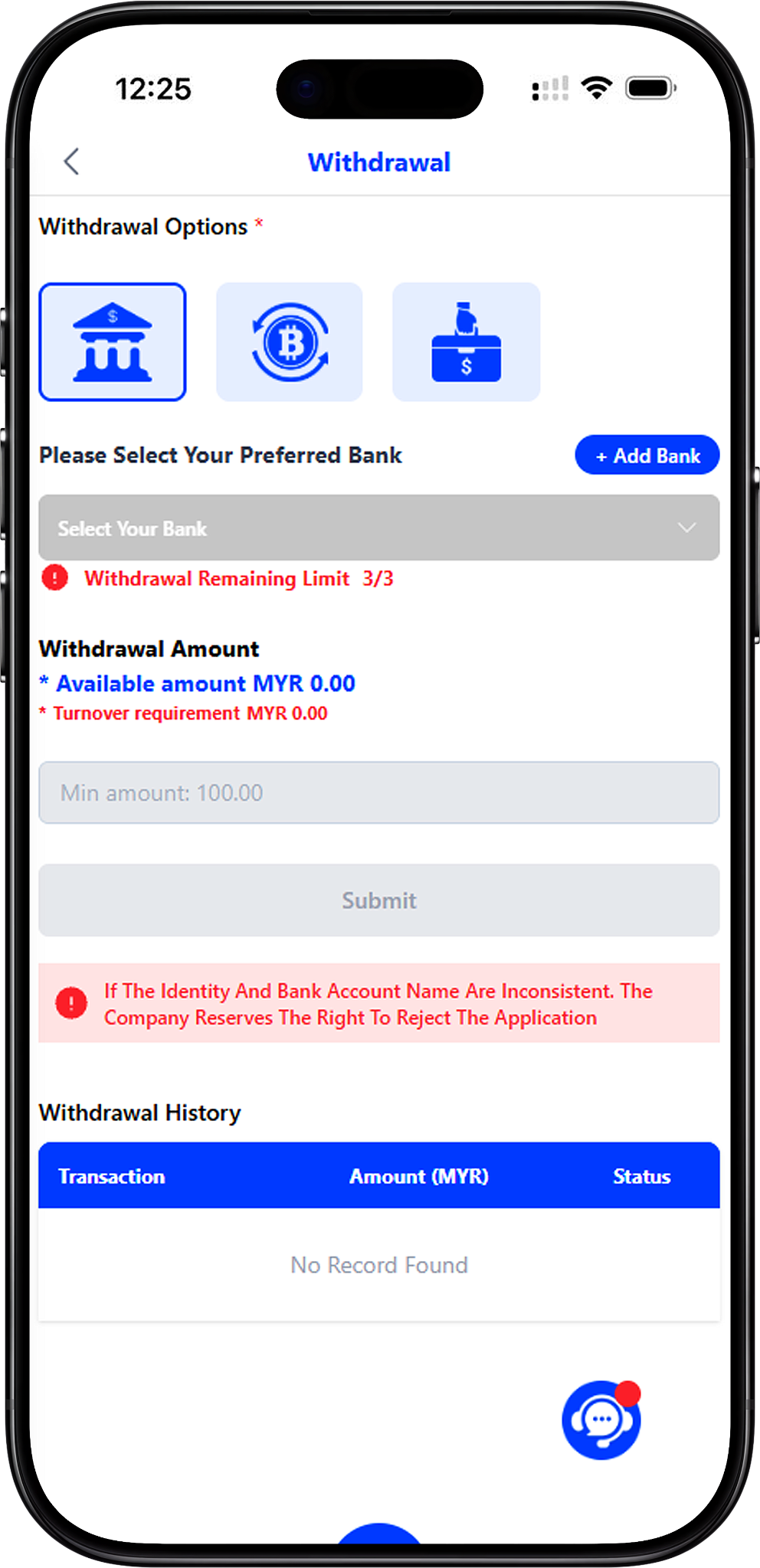
The withdrawal process involves selecting a method, choosing or adding the required payment account, checking the available amount and turnover requirement, entering the withdrawal amount and reviewing the information before submission.
Step 1. Open the Withdrawal Page
Sign in to your account and open the Withdrawal section. Review the information displayed on the page before starting a new request, especially your available amount and any applicable turnover requirement.
Step 2. Select a Withdrawal Option
Choose the method you want to use. The supplied interface displays Bank Transfer, Crypto and Cash Withdrawal. The fields and verification requirements may differ depending on the selected method.
Step 3. Select Your Preferred Bank
When using Bank Transfer, choose your preferred bank from the bank selector. If no suitable withdrawal account has been added yet, select the Add Bank option and complete the required account information first.
Step 4. Complete Identity Verification When Required
The supplied identity verification form asks for your full name as shown on the bank account, selected bank, bank account number, Malaysian phone number and OTP code. Enter accurate information and request the OTP to continue with verification.
Step 5. Add and Verify Your Bank Account
Make sure the bank account belongs to the appropriate account holder and that the submitted identity information matches the bank account details. For a focused setup walkthrough, see How To Add New Withdrawal Account? (/en/user-guide/how-to-add-new-withdrawal-account) (Internal Link).
Step 6. Check the Available Amount and Turnover Requirement
Review the Available Amount and Turnover Requirement displayed above the withdrawal amount field. These values indicate whether funds are currently available for a withdrawal request and whether relevant conditions have been satisfied.
Step 7. Enter the Withdrawal Amount
Enter an amount that complies with the limits currently displayed on the withdrawal page. The supplied Bank Transfer interface shows a minimum amount of MYR 100 and provides preset choices of MYR 100, MYR 200, MYR 500, MYR 1,000 and MYR 2,000. Current limits should always be checked before submission.
Step 8. Review the Withdrawal Details
Confirm the selected withdrawal option, preferred bank, account information and requested amount. Correct any inaccurate information before submitting the request.
Step 9. Submit the Withdrawal Request
Select Submit after all required fields and conditions have been completed. Do not submit bank information belonging to an unintended recipient, and verify the details carefully before confirming the request.
Step 10. Track the Withdrawal Status
After submitting a request, review Withdrawal History for its recorded status. For instructions on filtering transactions by date and status, open Track Your Withdrawal History (/en/user-guide/track-your-withdrawal-history) (Internal Link).
Withdrawal Options
Bank Transfer
Bank Transfer is displayed as one of the available withdrawal methods. Users need to select a preferred bank account, check the withdrawal conditions and enter an eligible amount before submitting the request.
Crypto
Crypto is displayed as another withdrawal option in the supplied interface. When this method is available for an account, users should follow the wallet and network information presented during the withdrawal process and carefully verify destination details before confirmation.
Cash Withdrawal
Cash Withdrawal also appears among the available options. Requirements may differ from Bank Transfer, so follow the current on-screen instructions whenever this method is selected.
Identity Verification and Bank Account Setup
Why Identity Details Matter
Identity verification helps connect the withdrawal request with the appropriate account and payment details. The supplied form requests the user’s full name as per the bank account before bank and contact verification are completed.
Enter Your Full Name as Per Bank Account
Enter the full name associated with the bank account you intend to use. The withdrawal interface warns that inconsistent identity and bank account names may result in the application being rejected, so check spelling and account ownership carefully.
Select Your Bank and Enter the Account Number
Choose the relevant bank and provide the bank account number requested by the verification form. Verify every digit before proceeding because incorrect banking details can interfere with the withdrawal process.
Verify Your Malaysian Phone Number
The supplied verification form displays the +60 country code and asks for a phone number. Enter the relevant number and use Send OTP to request the verification code.
Enter the OTP Code and Verify
Enter the received OTP code in the verification field and select Verify when the form becomes available for submission. If an expected OTP is not received, use the Contact Us option displayed on the verification screen rather than repeatedly entering an incorrect code.
Add a New Withdrawal Account
The withdrawal page provides an Add Bank option for setting up another bank account. The dedicated Add New Withdrawal Account Guide (/en/user-guide/how-to-add-new-withdrawal-account) (Internal Link) explains the account-adding process in more detail.
Withdrawal Amount and Requirements
Check Your Available Amount
The Available Amount shown on the withdrawal page indicates the amount currently presented as available in the withdrawal interface. Check this figure before entering a request so the amount does not exceed what is currently available.
Review the Turnover Requirement
The interface separately displays a Turnover Requirement. Review this requirement before attempting to submit a withdrawal, as applicable account or promotional conditions may affect whether a request can proceed.
Follow the Current Minimum Withdrawal
The supplied Bank Transfer screen displays a minimum withdrawal amount of MYR 100. Limits and available methods may change, so rely on the minimum and other conditions displayed in your account at the time of the request.
Check the Remaining Withdrawal Limit
The supplied interface also displays a Withdrawal Remaining Limit indicator. Review the current value before submitting another request, particularly when multiple withdrawals have already been made within the applicable period.
Withdrawal History
Review Previous Withdrawal Records
The Withdrawal History section provides columns for Date, Reference No, Transaction, Amount (MYR) and Status. These records can help users identify previous requests and review their recorded transaction status.
Search Withdrawal History by Date and Status
For a more detailed search, Track Your Withdrawal History (/en/user-guide/track-your-withdrawal-history) (Internal Link) explains how to open History, select Withdrawal as the transaction type, enter start and end dates, choose a preferred status such as pending, approved or rejected, and view the resulting records.
Important Withdrawal Checks
Make Sure the Identity and Bank Account Names Match
The supplied withdrawal notice states that the company reserves the right to reject an application when the identity and bank account names are inconsistent. Use accurate account-holder information and review it before verification and submission.
Verify Bank Details Before Submitting
Check the bank name and account number carefully before confirming a withdrawal request. If an existing payment account is outdated or incorrect, add or select the appropriate account instead of submitting funds to unintended details.
Review Conditions Before Requesting Funds
Available amount, turnover requirements, withdrawal limits and minimum amounts can affect a request. Review the current values shown in the withdrawal interface rather than relying on information from a previous transaction.
Protect Your OTP
Treat an OTP as account verification information. Enter it only through the intended verification process and do not disclose it to another person.
Request Your Withdrawal
Choose an available withdrawal method, verify your payment details, check the current amount and turnover requirements, and review all information carefully before submitting your request.